Banner Standard Sizes – Complete Guide to Banner Dimensions for Web and Ads
Discover the essential banner sizes for web and ads to ensure your designs are optimized for performance and visual appeal with Phot.AI.
Table of Contents
- 1. Introduction
- 2. What Are Standard Banner Sizes?
- 3. Banner Size Chart—Most Common Dimensions
- 4. Website Banner Sizes for High Conversion
- 5. Banner Dimensions for Ads
- 6. Banner Size in Pixels
- 7. Why Use Standard Banner Sizes?
- 8. Design Banners with Phot.AI
- 9. Final Thoughts
Introduction
Choosing the right banner size is crucial for ensuring your ad or website banner looks great and performs effectively. With Phot.AI, you can design responsive, high-converting banners by using the most common banner sizes for display ads, websites, and marketing campaigns.
This guide covers the essential standard banner sizes, including their dimensions in pixels and where to use them, so your visuals always look sharp, professional, and optimized.
What Are Standard Banner Sizes?
Standard banner sizes are predefined dimensions used across websites, display ad networks like Google Ads, and mobile devices. Using the correct banner dimensions ensures compatibility, faster load times, and better CTRs (Click-Through Rates).
Below is a banner size chart featuring the most widely used web banner sizes accepted across platforms.
Banner Size Chart – Most Common Dimensions
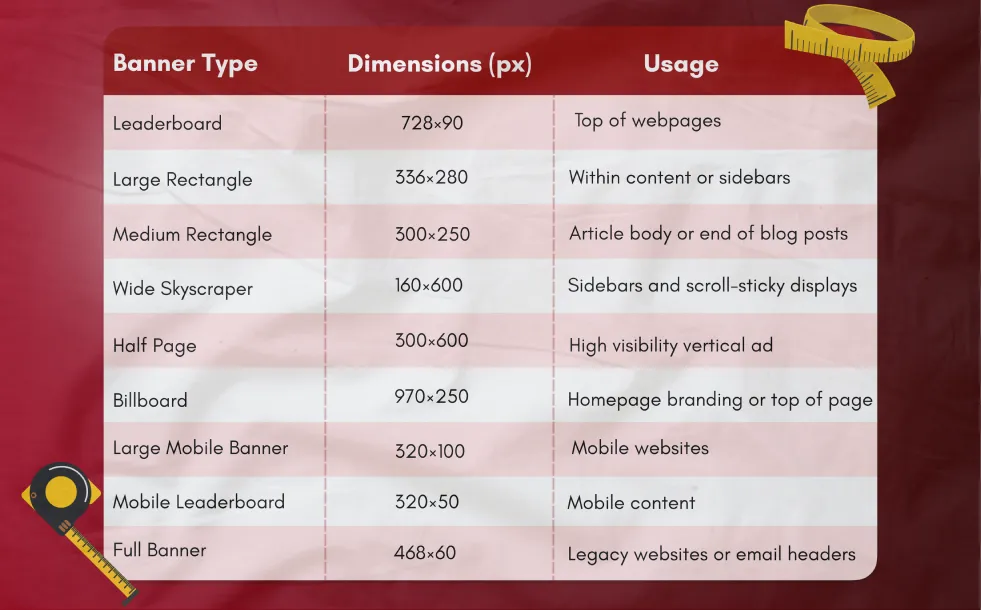
These are the most common banner ad sizes recommended by the IAB (Interactive Advertising Bureau), ensuring compatibility across networks.
Website Banner Sizes for High Conversion
Selecting the right website banner size can dramatically influence how visitors interact with your brand. Banners placed in hero sections, product pages, or as call-outs need to be pixel-perfect.
Popular banner sizes for websites include :
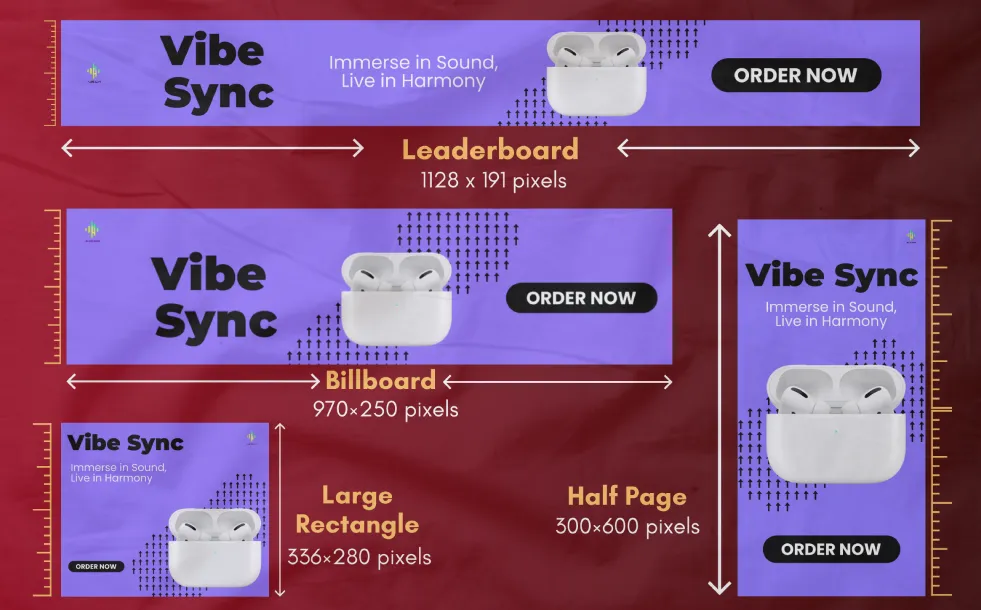
i. 728×90 (Leaderboard) – Best for homepage headers
ii. 970×250 (Billboard) – For strong branding visuals
iii. 336×280 (Large Rectangle) – Converts well in mid-content placements
iv. 300×600 (Half Page) – For detailed promotions and sales
All website banner sizes created in Phot.AI are optimized for clarity, responsiveness, and load speed.
Banner Dimensions for Ads
The standard display ad sizes you choose impact your ad's ability to scale across devices and placements. These formats are optimized for Google Display Network, programmatic ads, and social media platforms.
Key Ad Sizes to Know:
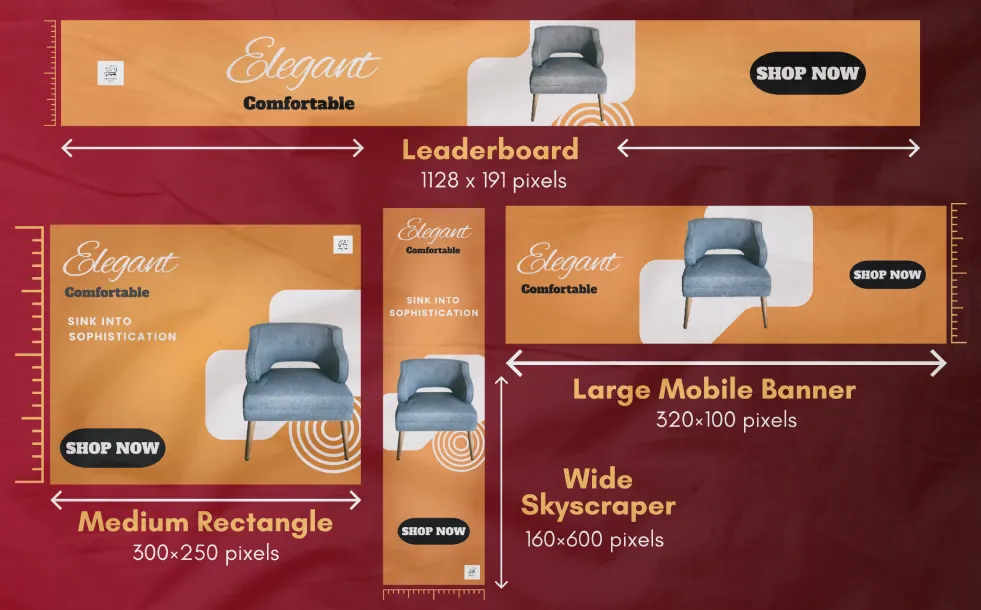
i. 300×250 (Medium Rectangle) – High-performing on both desktop and mobile
ii. 728×90 (Leaderboard) – Great for awareness at the top of the page
iii. 160×600 (Wide Skyscraper) – For sidebars and retargeting funnels
iv. 320×100 (Large Mobile Banner) – Mobile-optimized and engaging
Design with the correct banner ad sizes to ensure performance, branding accuracy, and visual appeal.
Banner Size in Pixels
When using any banner design tool, it's important to understand banner size in pixels. Here’s a quick reference:
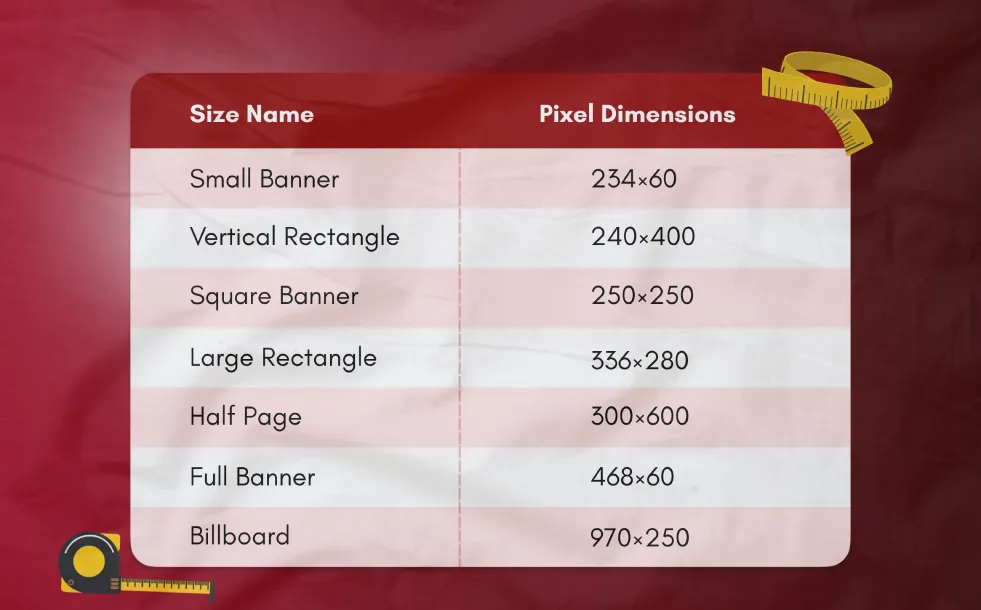
These sizes represent the industry’s most used web banner sizes.
Why Use Standard Banner Sizes?
Using standard web banner sizes ensures:
i. Seamless integration with ad networks
ii. Higher CTRs and lower CPCs
iii. Improved visual consistency
iv. Faster loading times
v. Better audience targeting
Phot.AI includes a banner size chart to help you design for every possible format with ease.
Design Banners with Phot.AI
Whether you're designing banners for display networks, SaaS websites, or Shopify stores, Phot.AI helps you choose the right banner size website layout through AI-powered suggestions. You can start from scratch or use hundreds of banner templates tailored to the standard banner sizes in pixels.
Final Thoughts
Understanding and using standard banner sizes ensures better engagement, professional presentation, and greater campaign performance. From banner size in pixels to full-page branding creatives, Phot.AI equips you with every tool needed to create stunning visuals using AI-powered design.