LinkedIn Background Photo Ideas to Boost Your Professional Image
Elevate your LinkedIn profile with the perfect background photo by exploring creative ideas and industry-specific tips with Phot.AI.
Table of Contents
- 1. Introduction
- 2. Why Does Your LinkedIn Background Photo Matter?
- 3. LinkedIn Background Photo Ideas by Industry
- 4. Best LinkedIn Background Images: Tips for Choosing
- 5. Best Background for LinkedIn Headshot Positioning
- 6. LinkedIn Cover Photo Size Guidelines
- 7. LinkedIn Cover Photo Examples Created with Phot.AI
- 8. Final Thoughts
Introduction
When someone visits your LinkedIn profile, one of the first things they notice—besides your headshot and headline—is your LinkedIn background photo. This often-overlooked visual plays a key role in telling your story, establishing credibility, and building trust. In this article, we’ll explore the best LinkedIn background photo ideas, explain what makes a good LinkedIn background, and show you how to easily create one using Phot.AI.
Why Does Your LinkedIn Background Photo Matter?
Your LinkedIn cover photo is digital real estate at the top of your profile. It’s not just a decorative space—it’s a branding opportunity. Whether you want to appear approachable, innovative, authoritative, or creative, your LinkedIn banner photo can reinforce that image without saying a word.
A professional LinkedIn background can:
i. Increase your profile views
ii. Make your profile more memorable
iii. Strengthen your personal or business brand
iv. Help recruiters or clients understand your niche
LinkedIn Background Photo Ideas by Industry
Here are some LinkedIn background ideas curated for various industries, along with LinkedIn cover photo examples you can create with Phot.AI.
- 1. Corporate Professionals
Opt for clean, high-resolution cityscapes, subtle gradients, or photos of collaborative office settings. These are good backgrounds for LinkedIn that give a polished, trustworthy vibe.
- 2. Designers & Creatives
Use abstract artwork, bold colors, or typography-focused images. These types of best LinkedIn background photos let your creative personality shine.
- 3. Tech & Developers
Go for dark-themed interfaces, code snippets, or AI-inspired designs. These reflect modernity and innovation.
- 4. Coaches & Consultants
Select LinkedIn cover photo ideas with motivational quotes, writing pads, or books. These suggest leadership and knowledge.
- 5. Entrepreneurs & Founders
Showcase your product, workspace, or team. Personal branding is key, so use best LinkedIn background images that resonate with your company mission.
Best LinkedIn Background Images: Tips for Choosing
When choosing a LinkedIn background photo, remember:
i. Stay on-brand: Use your brand’s colors, tone, and themes.
ii. Keep it simple: Avoid clutter or busy patterns.
iii. Use high-resolution images: Blurry photos diminish professionalism.
iv. Avoid overlapping: Leave space on the left where your profile photo appears.
The best LinkedIn cover photos are clear, on-brand, and contextually relevant.
Where to Find Good LinkedIn Backgrounds
Instead of searching endlessly, use Phot.AI to generate ready-to-use LinkedIn banner photos. Here’s how:
1. Select Your Industry
Choose from a variety of templates for corporate, creative, or freelance professionals.
2. Customize with AI
Upload your brand logo or text, and Phot.AI will suggest layouts, colors, and font pairings.
3. Download and Upload to LinkedIn
Get a perfectly sized, high-resolution image optimized for LinkedIn’s specifications.
Best Background for LinkedIn Headshot Positioning
Since LinkedIn overlays your headshot and name on the left, your best background for LinkedIn headshot should have clean space on that side. Avoid placing key design elements or text behind your profile image.
With Phot.AI, you can preview exactly how your LinkedIn cover photo will look—so there’s no guesswork involved.
LinkedIn Cover Photo Size Guidelines
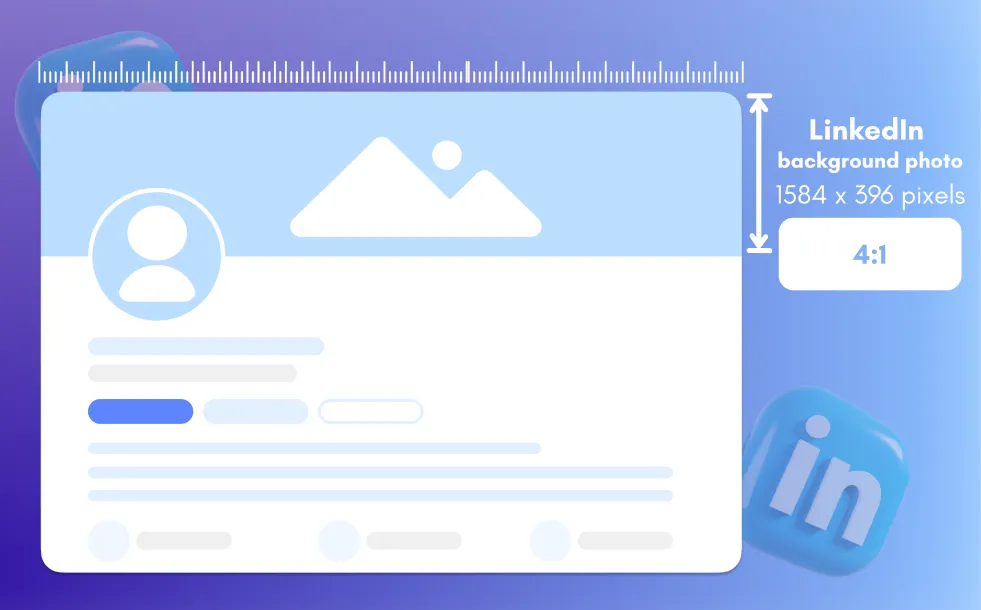 To make sure your LinkedIn background photo displays correctly:
i. Recommended size: 1584 x 396 pixels
ii. Format: JPG or PNG
iii. File size: Under 8MB
iv. Aspect ratio: 4:1
Use Phot.AI’s preset sizing templates to get it right every time.
LinkedIn Cover Photo Examples Created with Phot.AI
Need some inspiration? Here are a few LinkedIn cover photo examples our users created with Phot.AI:
i. A consultant used a modern black-and-white office background with a bold slogan
ii. A graphic designer chose vibrant gradients with minimalistic icons
iii. A startup founder displayed a team brainstorming session in their workspace
iv. A public speaker featured a backdrop from a recent keynote
Each image reflected their personal brand and helped them stand out.
Final Thoughts
Your LinkedIn background photo speaks before you do. With Phot.AI, creating a professional, impactful, and unique banner is simple—even if you have no design experience. Use it to create your own LinkedIn cover photo, choose from countless LinkedIn banner photos, or generate new LinkedIn cover photo ideas that align with your goals.
Whether you're looking for the best LinkedIn background, a clean professional LinkedIn background, or good LinkedIn background photos that represent your niche, Phot.AI has you covered.